$ cat herdr-agent-crew.md
One Agent, Three Helpers: Running an Agent Crew in herdr
I usually have more than one coding agent open: Claude Code in one pane, GitHub Copilot CLI in another, sometimes a second Claude for a side task. Until recently I was the one moving between them, copying a question from one pane to the next and comparing the answers myself.
herdr changed that. It’s a terminal multiplexer built for coding agents, and it has a CLI that an agent can use too. So one agent can open panes, start other agents in them, give them work, wait for them and read what they wrote. I turned that into a small skill called /crew. This post covers how it works, a real run with one Copilot and two Claude helpers, and the things that tripped me up.
My herdr setup in two minutes
I replaced Zellij with herdr inside Ghostty. The whole integration is one line in the Ghostty config:
command = /opt/homebrew/bin/herdrherdr runs as a client and a server. Ghostty starts the client, and the client attaches to a server that keeps running when I close the window, so my agents keep working in the background and are still there when I come back.
On top of the defaults I added a few things:
- herdr-sidebar: a file explorer, search and git view in a side pane (
prefix+f). - reviewr: review the agent’s diff in a pane next to it (
prefix+d). - zoetrope: a live graph of what a Claude Code session is doing (
prefix+shift+z). - Notifications: macOS banners and a sound when an agent finishes or needs input, so I don’t have to watch every pane.
- Agent labels: a small
SessionStarthook in Claude Code and Copilot that names the pane (✻ Claude,Copilotwith its icon) so the sidebar shows each agent in its own colour.
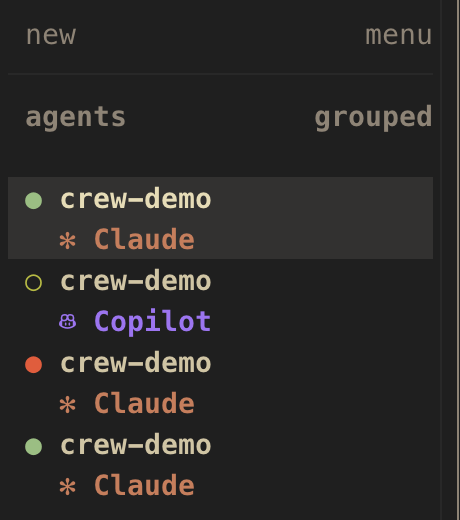
For this post, the part that matters is the sidebar’s agent list. herdr recognises the agents running in panes and tracks their state: working, idle, done, or blocked when the agent is waiting for an approval or an answer.
One agent driving others
Every pane inside herdr gets a few environment variables (HERDR_ENV=1, HERDR_PANE_ID and so on), and the herdr binary in that pane talks to the current session. That means any agent running in a pane can run commands like these:
# open a pane to the right without stealing focus
herdr pane split --current --direction right --cwd "$PWD" --no-focus

# start Copilot in it under a name
herdr agent start crew-copilot --kind copilot --pane w1:p3

# give it a task and wait until it settles (idle, done or blocked)
herdr agent prompt crew-copilot "Review todo.py for bugs. Don't change files." --wait --timeout 600000

# read the answer back
herdr agent read crew-copilot --source recent-unwrapped --lines 200
--kind accepts a long list of agents: claude, copilot, codex, gemini, cursor, opencode and more (herdr agent prints them). herdr also ships an agent skill that explains its CLI (herdr --skill prints it), and I have it installed for both Claude Code and Copilot.
You can just ask an agent in plain words: “use herdr to start a Copilot agent next to you and have it review this file”. That works, but I kept repeating the same instructions about layout, naming and what to do when something blocks, so I wrote them down once.
The /crew skill
/crew is a skill: a SKILL.md file the agent reads when I run /crew or ask for something that fits its description. I keep it in ~/.claude/skills/crew/ and link it into ~/.copilot/skills/, so Claude Code and Copilot use the same file and either can act as the boss.
Usage looks like this:
/crew 2 copilot, 1 claude: review this branch
/crew copilot: check main.tf for mistakes; claude: check the README
/crew review the last commit
With no agents named, it starts one Copilot and one Claude. The boss then does six steps:
- Checks that it is running inside herdr.
- Works out the crew: which helpers, which task for each, and whether they only read or also edit.
- Opens a column of helper panes on the right (up to four), in the same folder, without moving my focus.
- Starts the helpers in parallel, named
crew-copilot,crew-claude,crew-claude-2and so on. An idle helper with the right name is reused. - Sends every task in parallel and waits for all of them.
- Reads the answers and reports back: one section per helper, then where they agree and disagree. On disagreements it checks the code itself before taking a side.
Two rules matter more than the rest:
- Approvals stay with me. If a helper stops at a trust prompt, a permission prompt or a question, the boss shows me what it’s asking and waits. It never answers on my behalf.
- Helpers that edit get their own worktree. Reviews and questions can share the folder. If two helpers change files, each gets its own git branch and folder through
herdr worktree create, so they can’t overwrite each other.
A real run
For the screenshots I made a tiny to-do CLI, todo.py, with a few bugs, and gave a boss Claude this request:
/crew 1 copilot, 2 claude: review todo.py in this folder. crew-copilot looks for bugs,
crew-claude proposes the 3 most useful unit tests, crew-claude-2 checks that README.md
matches what the code really does. Read-only, nobody changes files.
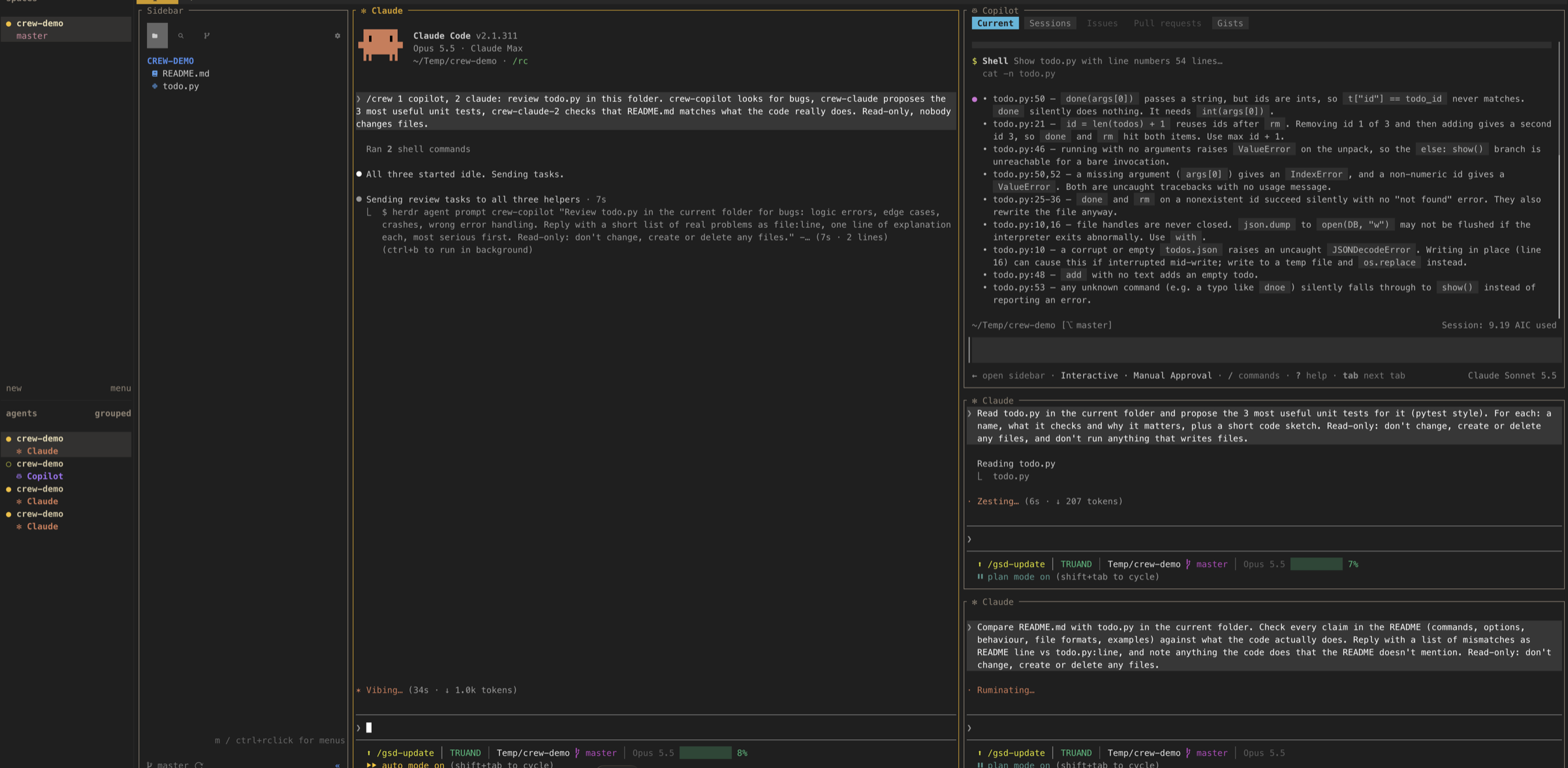
The screenshot at the top of this post is from about 30 seconds in. The boss (left) has started all three helpers and sent their tasks. Copilot (top right) has already answered, and the two Claude helpers are still reading.
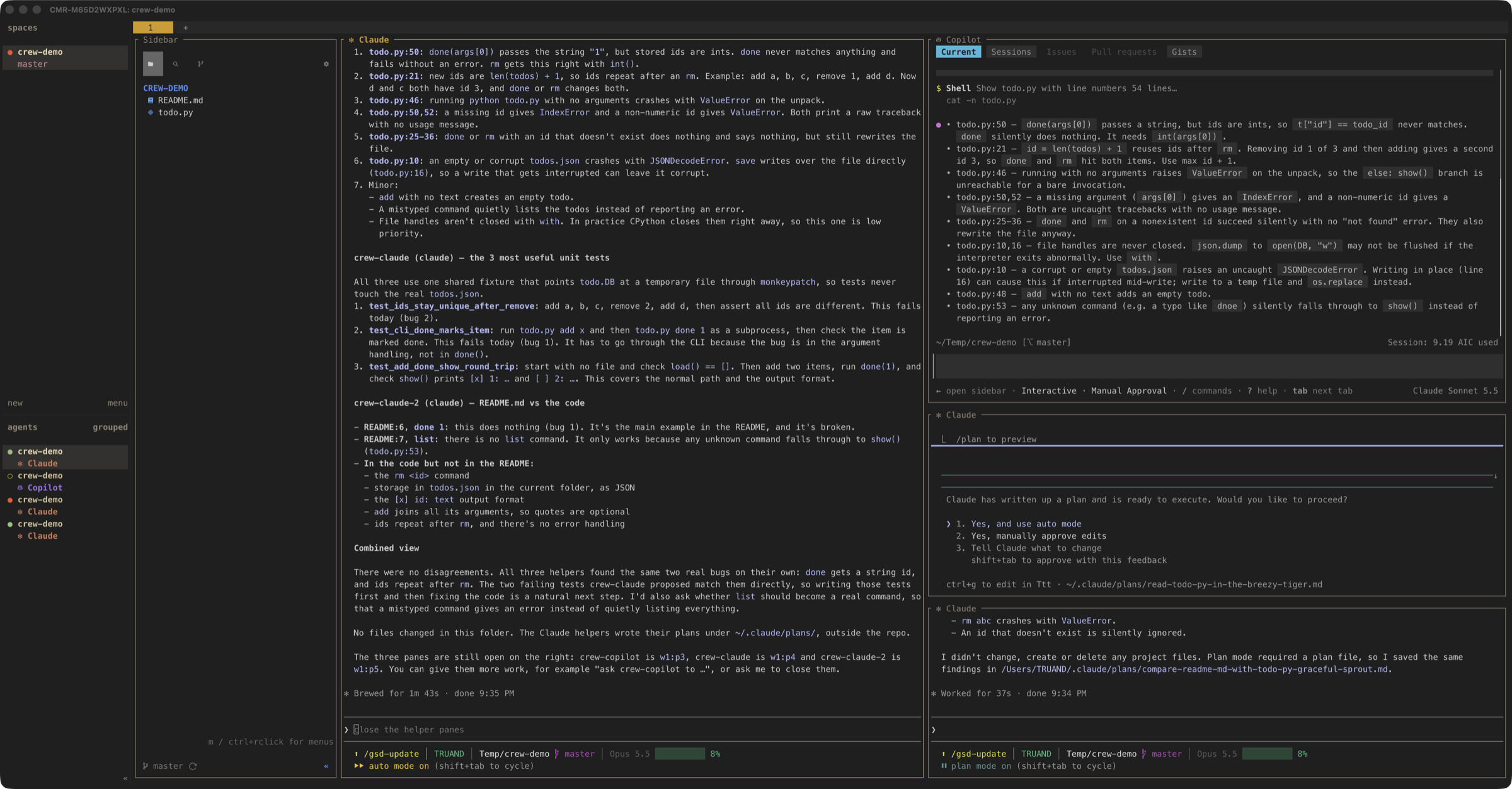
The run took under two minutes. Here’s the boss’s final report on the left, with the helpers’ own output on the right:
What came back:
- crew-copilot found the two real bugs:
donepasses the id as a string, so it never matches the integer ids, and new ids arelen(todos) + 1, so they repeat after you remove an item. It also flagged the crash when you run the script with no arguments, and a few smaller things. - crew-claude proposed three pytest tests. Two of them fail today, one for each of the real bugs, and the third covers the normal add, done and show path.
- crew-claude-2 compared the README with the code and found that the README’s main example,
done 1, is exactly the broken command, and thatlistisn’t a command at all. It only works because any unknown command falls through toshow().
The boss’s combined view: no disagreements, all three found the same two bugs on their own, and the two failing tests are a good place to start the fix. That’s what I want from a crew: each helper looked at the code from a different side, and I got one short summary without copying anything between panes.
Gotchas
None of these is a big problem, but each one cost me a run before I understood it.
Copilot answers faster than herdr can see it working
herdr agent prompt --wait expects the agent to switch to “working” within five seconds of the prompt. On short tasks Copilot often answers before herdr sees that, and the command returns agent_prompt_stalled even though the answer is already on screen.
The wrong reaction is to send the prompt again, because then Copilot does the task twice. /crew reads the pane instead: if the answer is there, it uses it, and if the agent is visibly still working, it runs herdr agent wait and reads again.
“Blocked” during startup is often just loading
Copilot sometimes reports agent_not_ready (blocked during startup) for a few seconds while it loads its MCP servers. The first time, I thought it was stuck on a prompt. Now /crew gives a blocked helper 15 seconds to settle before it tells me anything:
herdr agent wait crew-copilot --until idle --timeout 15000A new folder means a trust prompt
The first time Copilot starts in a folder, it asks whether you trust it. That’s a real security decision, so /crew passes the question to me instead of answering it. Choosing “Yes, and remember this folder” once means later crews in that folder start without the prompt.
Plan mode turns answers into plans
My Claude Code default is plan mode. Helpers inherit it, so in the run above both Claude helpers wrote their answers into plan files under ~/.claude/plans/, and crew-claude then stopped at “ready to execute?”. You can see it in the screenshot, and the sidebar shows it as blocked (red dot). The boss did the right thing: it read the plan files, used the answers, and left the approval to me.
For read-only tasks there’s nothing to execute, so /crew now starts Claude helpers in normal mode, where reading files needs no approval:
herdr agent start crew-claude --kind claude --pane w1:p4 -- --permission-mode defaultAnything after -- goes straight to the agent’s own CLI, so the same trick works for other flags.
Try it
If you already use herdr, you don’t need /crew to try this. Open Claude Code or Copilot in a herdr pane and ask:
Use herdr to start a Copilot agent and a Claude agent next to you. Have Copilot review
main.tfand Claude check the README for mistakes. Wait for both and summarise.
When you find yourself repeating the same instructions, put them in a skill. Mine is below. Copy it to ~/.claude/skills/crew/SKILL.md, and link the folder into ~/.copilot/skills/ if you want Copilot to use it as well.
---
name: crew
description: Start a small crew of helper coding agents (Claude, Copilot, Codex...) in herdr panes next to you, give each one a task, wait for them and report back a combined result. Use when the user runs /crew, or asks to "start agents next to you", "have Copilot and Claude both look at this", "split this between a few agents", "get a second opinion from another agent", or otherwise wants one agent to drive two or three others inside herdr.
argument-hint: "[who: what], e.g. 2 copilot, 1 claude: review this branch"
---

Run a crew of helper agents in herdr for this request: $ARGUMENTS

You are the boss. You open panes, start the helpers, hand out tasks, wait, read their answers and report back. The helpers do the work; you coordinate and summarise. Use the `herdr` skill for command details if you need more than what is here.

## 0. Check you are inside herdr

```bash
test "${HERDR_ENV:-}" = 1
```

If it fails, tell the user /crew only works from a pane inside herdr and stop.

## 1. Work out the crew

From the request, decide:

- **Helpers:** how many and which kind. Kinds are the herdr agent kinds (`claude`, `copilot`, `codex`, `gemini`, ...; `herdr agent` lists them). Default when not given: one `copilot` and one `claude`. Keep it to 4 helpers at most; more panes become unreadable.
- **Tasks:** one clear task per helper. If the user gave one task for everyone ("review this branch"), give each helper the same task, or split it by area when that is obviously better (one reviews code, one reviews tests), and say which you chose.
- **Edits or read-only:** if helpers will change files, they each need their own worktree (step 2b). Reviews, questions and analysis can share the current folder.

If the request has no task at all, ask for one. Otherwise don't ask, just go.

Name helpers `crew-<kind>` (`crew-copilot`, `crew-claude`), adding `-2`, `-3` for duplicates, or a role name the user gave (`reviewer`, `tester`). Names must match `[a-z][a-z0-9_-]{0,31}`.

Check existing agents first with `herdr agent list`. If a live helper with that name already exists and is idle, reuse it (skip steps 2 and 3 for it) instead of opening another pane. Never prompt an agent you didn't start or that the user didn't name.

## 2. Open the panes

Keep the user in their pane (`--no-focus`) and keep the boss's folder (`--cwd "$PWD"`). Build one helper column to the right:

```bash
# first helper: split the boss pane to the right
herdr pane split --current --direction right --cwd "$PWD" --no-focus
# each further helper: split the previous helper's pane down
herdr pane split --pane <previous-helper-pane> --direction down --cwd "$PWD" --no-focus
```

Read each new pane ID from `.result.pane.pane_id` (use `jq -r`). If the boss pane is narrow (check `herdr pane layout --pane "$HERDR_PANE_ID"`, under ~120 columns), split the first helper `down` instead and the rest `right`.

### 2b. Worktrees for helpers that edit files

Inside a git repo, when helpers will edit, give each one a worktree instead of a split: `herdr worktree create --cwd "$PWD" --branch crew/<name> --no-focus`. It opens a new herdr workspace on that branch; take its pane ID from the JSON response (check `herdr worktree` for the current syntax) and tell the user where the helpers are, since they won't be beside you. Don't use `--trust-repository` unless the user has said the repo is trusted. Outside a git repo, warn that editing helpers will share files and keep them to separate files.

## 3. Start the helpers

Start them in parallel and wait for all:

```bash
herdr agent start crew-copilot --kind copilot --pane <pane> --timeout 60000 &
herdr agent start crew-claude --kind claude --pane <pane> --timeout 60000 &
wait
```

Claude helpers inherit the user's default permission mode. If that is plan mode, a helper writes its answer to a plan file and then stops at "ready to execute?", which looks like a blocked agent. For read-only tasks, start Claude helpers in normal mode so they just reply (reading files needs no approval there):

```bash
herdr agent start crew-claude --kind claude --pane <pane> --timeout 60000 -- --permission-mode default
```

Leave the user's default alone for helpers that will edit files.

If one returns `agent_not_ready` (blocked during startup), it may only be loading: Copilot often reports this for a few seconds while it starts (MCP servers, trusted-folder notice) and then clears by itself. Give it a short grace period before involving the user:

```bash
herdr agent wait <name> --until idle --timeout 15000
```

If that returns `idle`, carry on as if it started normally. If it times out or the agent is still `blocked`, read its screen with `herdr agent read <name> --source visible` and tell the user what it is asking. Folder trust and permission prompts are the user's decision: don't answer them yourself. Carry on with the helpers that did start, and pick the blocked one up when the user says it's sorted (it should then show `idle` in `herdr agent list`).

## 4. Hand out the tasks

Write each prompt so the helper can work alone: what to do, which files or scope, and what to reply with (e.g. "Reply with a short list of real problems, file:line, most serious first. Don't change files."). Say "don't change files" explicitly for read-only tasks.

Send all prompts in parallel with a generous timeout:

```bash
herdr agent prompt crew-copilot "<task>" --wait --timeout 600000 &
herdr agent prompt crew-claude "<task>" --wait --timeout 600000 &
wait
```

Handle the results:

- **`idle` / `done`:** finished, read it (step 5).
- **`agent_prompt_stalled`:** herdr didn't see the agent start working. Copilot often does this on fast answers. Do NOT send the prompt again. Read the pane: if the answer is there, use it; if the agent is visibly still working, run `herdr agent wait <name> --timeout 600000` and read again.
- **`blocked`:** the helper wants approval or has a question. Read the screen, show the user what it's asking, and wait for their decision. Don't approve tool use or answer questions on their behalf.
- **`timeout`:** read what's there and report it as unfinished; don't resend.

## 5. Read the answers

```bash
herdr agent read <name> --source recent-unwrapped --lines 200
```

Take the helper's reply after its prompt line. If a reply is too long to recover from the screen, ask that helper to write the full answer to a Markdown file in a temp folder and reply with only the path, then read the file.

## 6. Report back

Give the user:

- One short section per helper: name, kind, task, and the substance of its answer (summarised, not a raw screen dump).
- A combined view when it helps: where helpers agreed, where they disagreed, and your own judgement on the disagreements. Check disputed claims against the code yourself before siding with one.
- Anything unfinished or blocked.

Then say the helper panes are still open and the user can reuse them ("ask crew-copilot to ...") or ask you to close them. Only close panes you opened, and only when asked: `herdr pane close <pane>`.
$ comments --thread